
| 일 | 월 | 화 | 수 | 목 | 금 | 토 |
|---|---|---|---|---|---|---|
| 1 | 2 | 3 | 4 | 5 | 6 | |
| 7 | 8 | 9 | 10 | 11 | 12 | 13 |
| 14 | 15 | 16 | 17 | 18 | 19 | 20 |
| 21 | 22 | 23 | 24 | 25 | 26 | 27 |
| 28 | 29 | 30 | 31 |
- ARP
- PV
- MariaDB
- linux dns
- L2 통신
- ssh tunneling
- systemd-resolved
- linux domain
- L2 통작
- CoreDNS
- 127.0.0.53
- DNS
- 개발자취업부트캠프
- Spring boot
- Layer 2
- reclaim
- MegabyteSchool
- 국비지원교육
- RDB
- 내일배움카드
- dns forward
- 패스트캠퍼스
- k8s
- PVC
- 메가바이트스쿨
- Today
- Total
hoonii2
[k8s] API 서버에 인증서를 통한 직접 정보 조회 본문
1. 개요
prometheus service discovery 에서 relabel_config 설정이 k8s API 서버로 조회한 정보를 바탕으로 타겟을 필터링하고 relabel 작업을 수행합니다.
이 때 API 서버에 직접 API 요청을 하면 어떤 데이터를 받아오는지 궁금하여 이를 확인하는 방법을 정리합니다.
2. k8s API 정보
API 서버에서 Service 리소스 정보를 받아오는 것을 목적으로 하겠습니다.
https://kubernetes.io/docs/reference/generated/kubernetes-api/v1.30/#service-v1-core
Kubernetes API Reference Docs
API Overview Welcome to the Kubernetes API. You can use the Kubernetes API to read and write Kubernetes resource objects via a Kubernetes API endpoint. Resource Categories This is a high-level overview of the basic types of resources provide by the Kuberne
kubernetes.io
위 사용중인 k8s 버전과 일치하는 Service 리소스 관련 API 문서에서 아래 API URL 을 확인할 수 있습니다.
GET /api/v1/namespaces/{namespace}/services
{
    "kind": "Status",
    "apiVersion": "v1",
    "metadata": {},
    "status": "Failure",
    "message": "services is forbidden: User \"system:anonymous\" cannot list resource \"services\" in API group \"\" in the namespace \"default\"",
    "reason": "Forbidden",
    "details": {
        "kind": "services"
    },
    "code": 403
}
해당 주소를 Postman 혹은 인터넷 브라우저로 접속해보면 이처럼 권한 오류가 발생함을 알 수 있습니다.
3. 권한 오류 해결 방법
권한 해결 방법은 여러가지가 있습니다.
1. kubectl 사용 중인 경우 proxy 를 통한 접근
2. k8s 에서 client 인증서를 발급받아 이를 통한 접근
3. Service Account 의 jwt 를 통한 접근
1번의 경우 로컬 환경에서 kubectl 을 사용 중이라면 조금만 검색해도 쉽게 해결 가능합니다.
우선 이번 포스팅에서 2번 방법을 작성하고 3번 방안은 추후 정리하고 업로드하겠습니다.
4. Client 인증서 발급
저의 경우 Window 환경을 사용 중이며 client 인증서를 발급받기 위해 openssl 을 사용하여 rsa key 와 csr 을 생성했습니다.
( rsa 개인키의 경우 보안이 생명이므로 클라이언트에서 직접 생성하고 요청서를 만드는 것을 권장합니다. )
https://chocolatey.org/install
Installing Chocolatey
Chocolatey is software management automation for Windows that wraps installers, executables, zips, and scripts into compiled packages. Chocolatey integrates w/SCCM, Puppet, Chef, etc. Chocolatey is trusted by businesses to manage software deployments.
chocolatey.org
https://learn.microsoft.com/ko-kr/azure/confidential-ledger/create-client-certificate
Microsoft Azure 기밀 원장을 사용하여 클라이언트 인증서 만들기
클라이언트 인증서 만들기 아티클03/20/2024 기여자 6명 피드백 이 문서의 내용 --> 주의 이 문서에서는 EOL(수명 종료) 상태에 가까워진 Linux 배포판인 CentOS를 참조하세요. 이에 따라 사용 및 계획을
learn.microsoft.com
이 때 인증서 관련 도구는 powershell 패키지 매니저인 chocolatey 를 통해 openssl 을 설치해 사용했고 이는 위 링크를 참고했습니다.
PS E:\04. Cert\k8s_local> openssl genrsa -out client.key 2048
PS E:\04. Cert\k8s_local> ls


    디렉터리: E:\04. Cert\k8s_local


Mode                 LastWriteTime         Length Name
----                 -------------         ------ ----
-a----      2024-07-13   오후 3:57           1732 client.key
설치한 openssl 을 통해 client rsa 키를 생성합니다.
PS E:\04. Cert\k8s_local> notepad csr.config

[ req ]
default_bits = 2048
default_md = sha256
distinguished_name = dn
prompt = no

[ dn ]
O = system:hoons
CN = hoon_pc
<저장>

PS E:\04. Cert\k8s_local> openssl req -new -key .\client.key -out .\client.csr -config .\csr.config
인증 요청서에 필요한 내용을 config 파일로 저장하고 인증 요청서 csr 파일을 생성합니다.
k8s 는 CN (일반 이름) 을 통해 인증서의 사용자 이름을, O (조직) 를 통해 Group 리소스를 식별합니다.
위 정보 중 O (조직) 의 "system:hoons" 를 (5) RBAC 에서 사용할 예정입니다.
( 인증서 정보 중 O (조직) 값이 중요합니다. )
PS E:\04. Cert\k8s_local> scp -P 60010 .\client.csr root@127.0.0.1:/etc/kubernetes/pki/client/
root@127.0.0.1's password:
client.csr                                                                                                               100%  936   203.1KB/s   00:00
인증 요청서 파일을 k8s control plane 노드로 scp 를 통해 전달합니다.
root@cp-k8s:~# cd /etc/kubernetes/pki
root@cp-k8s:/etc/kubernetes/pki# ls
apiserver.crt              apiserver-etcd-client.key  apiserver-kubelet-client.crt  ca.crt  client  front-proxy-ca.crt  front-proxy-client.crt  sa.key
apiserver-etcd-client.crt  apiserver.key              apiserver-kubelet-client.key  ca.key  etcd    front-proxy-ca.key  front-proxy-client.key  sa.pub
root@cp-k8s:/etc/kubernetes/pki#
root@cp-k8s:/etc/kubernetes/pki# ls client/
client.csr
root@cp-k8s:/etc/kubernetes/pki#
root@cp-k8s:/etc/kubernetes/pki# openssl x509 -req -in client/client.csr -CA ca.crt -CAkey ca.key \
    -CAcreateserial -out client/client.crt -days 10000 -sha256
Certificate request self-signature ok
subject=O = system:hoons, CN = hoon_pc
k8s control plane 노드에서 self-signed ca 를 통해 전달받은 요청서를 바탕으로 인증서를 발급합니다.
( k8s self-signed ca 인증서와 개인키는 "/etc/kubernetes/pki" 에 위치해있습니다. )
PS E:\04. Cert\k8s_local> scp -P 60010 root@127.0.0.1:/etc/kubernetes/pki/client/client.crt .\
root@127.0.0.1's password:
client.crt                                                                                                               100% 1025   398.0KB/s   00:00
PS E:\04. Cert\k8s_local> ls


    디렉터리: E:\04. Cert\k8s_local


Mode                 LastWriteTime         Length Name
----                 -------------         ------ ----
-a----      2024-07-13   오후 4:37           1025 client.crt
-a----      2024-07-13   오후 4:17            936 client.csr
-a----      2024-07-13   오후 3:57           1732 client.key
-a----      2024-07-13   오후 4:17            129 csr.config

PS E:\04. Cert\k8s_local> openssl x509 -noout -text -in .\client.crt
Certificate:
    Data:
        Version: 1 (0x0)
        Serial Number:
            25:48:a8:a3:bf:35:9c:5d:06:9b:a5:0f:cc:34:ed:d9:ef:f7:76:43
        Signature Algorithm: sha256WithRSAEncryption
        Issuer: CN=kubernetes
        Validity
            Not Before: Jul 13 07:35:09 2024 GMT
            Not After : Nov 29 07:35:09 2051 GMT
        Subject: O=system:hoons, CN=hoon_pc
        Subject Public Key Info:
            Public Key Algorithm: rsaEncryption
                Public-Key: (2048 bit)
                Modulus:
                    00:9d:b4:58:ef:54:be:ee:e8:a8:c4:be:74:ef:50:
                    91:4b:64:bc:2a:1e:9b:19:9a:cd:29:8d:39:92:66:
                    60:c1:b6:c8:e5:09:17:a1:3a:f0:7a:de:49:ba:11:
                    11:2b:2c:e3:75:ae:4e:1d:3e:83:f5:73:38:19:b0:
                    15:55:d3:69:9e:d0:42:6a:e8:a7:0a:b9:b7:f7:05:
                    c7:56:2e:b3:69:71:0a:c6:f4:a3:a2:42:67:88:0d:
                    a5:30:29:b3:b2:07:c3:e5:e4:33:5d:dd:13:88:26:
                    b9:48:2b:a8:ae:0c:5c:c3:27:60:e5:f8:23:a2:60:
                    cf:c3:d4:18:c2:8b:c2:e1:66:44:4b:8f:be:64:35:
                    99:cd:1f:b9:e6:7d:24:69:2f:61:58:71:ed:63:f3:
                    a5:b7:58:66:cf:9b:de:54:d1:67:69:d3:0b:bd:8a:
                    79:c1:ae:b4:08:7a:d5:62:d6:40:bf:4f:7e:ab:40:
                    70:00:37:db:f4:bd:35:e2:0a:15:8c:cc:fe:67:05:
                    c9:bd:e5:84:a7:25:2c:69:66:8b:60:c5:c6:52:2a:
                    ed:c9:b9:8c:3d:b0:fe:c7:12:ab:30:75:f3:e6:e5:
                    4d:68:9a:14:9c:2e:cb:5d:dc:f6:3f:42:78:25:1e:
                    ce:86:7b:ad:38:e8:18:44:58:bf:4d:91:42:70:84:
                    ef:1b
                Exponent: 65537 (0x10001)
    Signature Algorithm: sha256WithRSAEncryption
    Signature Value:
        55:c5:0c:26:27:7a:8b:0e:8f:3d:ef:e0:a3:83:34:96:30:ce:
        5b:b4:57:d0:3c:b3:d0:d1:0d:ae:c0:25:77:0d:97:00:e0:62:
        c5:bc:3b:b5:74:4c:8c:63:e2:e4:37:9d:0e:6c:f2:55:bb:88:
        20:d0:f8:05:49:ec:23:7b:5e:ff:8b:70:c3:5e:9e:e3:b8:9a:
        0c:77:af:dc:ec:fd:69:c0:f7:cc:4a:a8:1b:77:8b:8b:01:1c:
        fd:67:e3:aa:66:a7:57:38:d8:f1:ba:8f:e5:95:34:53:a2:3b:
        84:02:77:35:79:0d:6c:12:71:36:3a:dc:da:97:a9:06:f6:82:
        32:4c:f5:00:1e:68:93:31:bf:09:f0:31:31:4e:3b:13:a2:e7:
        12:e8:d6:88:d3:28:6d:db:dc:04:18:a4:b7:2e:97:af:26:d7:
        19:92:b0:f3:42:46:61:4f:84:d1:e8:2c:8b:d2:30:57:de:ae:
        32:37:ea:ed:ac:d6:16:25:f5:91:46:8b:64:61:5f:aa:01:dd:
        8b:61:ec:0e:74:98:b7:f3:76:07:c4:ff:69:5a:83:f9:cf:dc:
        6c:7a:fe:c0:d7:d1:e5:45:d3:25:1c:94:29:21:f7:89:25:c1:
        9d:b2:6b:86:5b:93:7b:e0:80:75:f8:a2:25:37:91:ce:a2:ad:
        23:9d:88:81
발급한 인증서를 로컬 윈도우 환경으로 scp 를 통해 가져오고 인증서 정보를 확인하여 subject 내용이 정상적으로 들어있는지 확인합니다.
API 서버로의 요청에 잘 적용이 되는지 테스트하기위해 해당 인증서를 Postman 환경에 적용시킵니다.
1. Settings -> General -> Request -> SSL certificate verification -> off
2. Settings -> Certificates -> Client Certificates -> Add Certificate -> <아래 사진처럼 설정> -> Add
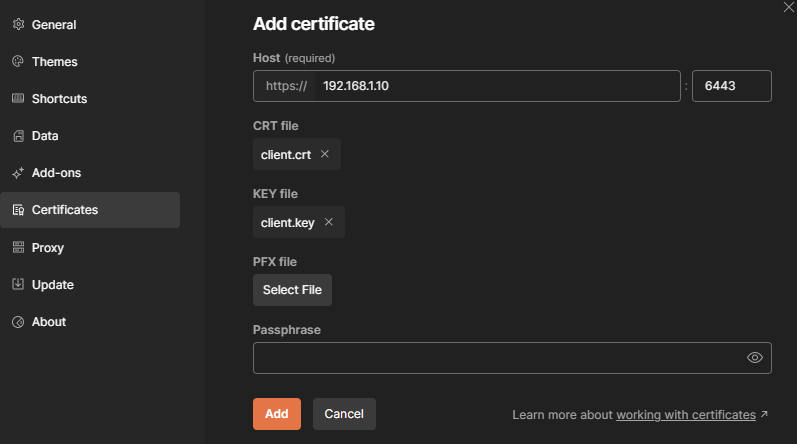
Host 는 API Server 로 설정해줍니다.
{
    "kind": "Status",
    "apiVersion": "v1",
    "metadata": {},
    "status": "Failure",
    "message": "services is forbidden: User \"hoon_pc\" cannot list resource \"services\" in API group \"\" in the namespace \"default\"",
    "reason": "Forbidden",
    "details": {
        "kind": "services"
    },
    "code": 403
}
하지만 아직 권한 오류가 발생합니다.
이유는 정확한 동작 확인을 위해 기존 사용 중인 O (조직) 값을 사용하지 않고 "system:hoons" 를 사용했기 떄문에 이를 k8s cluster 의 RBAC 에 지정하여 접근 권한을 부여해야합니다.
5. k8s RBAC 구성
root@cp-k8s:/etc/kubernetes/pki# kubectl get rolebindings,clusterrolebindings --all-namespaces \
 -o custom-columns='KIND:kind,NAMESPACE:metadata.namespace,NAME:metadata.name,GROUPS:subjects[?(@.kind=="Group")].name' \
 | grep system:masters
ClusterRoleBinding   <none>           cluster-admin                                                   system:masters

root@cp-k8s:/etc/kubernetes/pki# kubectl get clusterrolebinding cluster-admin -o yaml
apiVersion: rbac.authorization.k8s.io/v1
kind: ClusterRoleBinding
metadata:
  annotations:
    rbac.authorization.kubernetes.io/autoupdate: "true"
  creationTimestamp: "2024-07-05T07:18:39Z"
  labels:
    kubernetes.io/bootstrapping: rbac-defaults
  name: cluster-admin
  resourceVersion: "137"
  uid: 14069e22-4110-41f3-aa59-8e2a19f19e36
roleRef:
  apiGroup: rbac.authorization.k8s.io
  kind: ClusterRole
  name: cluster-admin
subjects:
- apiGroup: rbac.authorization.k8s.io
  kind: Group
  name: system:masters

root@cp-k8s:/etc/kubernetes/pki# kubectl get clusterrole cluster-admin -o yaml
apiVersion: rbac.authorization.k8s.io/v1
kind: ClusterRole
metadata:
  annotations:
    rbac.authorization.kubernetes.io/autoupdate: "true"
  creationTimestamp: "2024-07-05T07:18:38Z"
  labels:
    kubernetes.io/bootstrapping: rbac-defaults
  name: cluster-admin
  resourceVersion: "73"
  uid: 87fbba61-906f-447b-ba7f-c515c3a5f12e
rules:
- apiGroups:
  - '*'
  resources:
  - '*'
  verbs:
  - '*'
- nonResourceURLs:
  - '*'
  verbs:
  - '*'
기본적으로 k8s cluster 에 접근하는 admin 을 위한 기본 O (조직) 은 "system:masters" 입니다.
해당 O 가 사용하는 ClusterRoleBinding 은 "cluster-admin" 임을 확인하고 해당 정보를 확인합니다.
그리고 Binding 에서 사용하는 ClusterRole 값을 확인합니다.
cluster-admin role 은 관리자 목적으로 모든 권한을 허용하는 ClusterRole 입니다.
보안 상 최소 권한 원칙이 필수이지만 편한 테스트를 위해 이를 활용하겠습니다.
( 실 환경의 경우 별도 필요한 권한만 포함된 새로운 ClusterRole 생성이 권장됩니다. )
root@cp-k8s:~# cat > hoon_clusterrolebinding.yaml <<EOF
> apiVersion: rbac.authorization.k8s.io/v1
kind: ClusterRoleBinding
metadata:
  name: cluster-hoons
roleRef:
  apiGroup: rbac.authorization.k8s.io
  kind: ClusterRole
  name: cluster-admin
subjects:
- apiGroup: rbac.authorization.k8s.io
  kind: Group
  name: system:hoons
> EOF
root@cp-k8s:~#
root@cp-k8s:~# kubectl apply -f hoon_clusterrolebinding.yaml
clusterrolebinding.rbac.authorization.k8s.io/cluster-hoons created
root@cp-k8s:~#
root@cp-k8s:~# kubectl get rolebindings,clusterrolebindings --all-namespaces  -o custom-columns='KIND:kind,NAMESPACE:metadata.namespace,NAME:metadata.name,GROUPS:subjects[?(@.kind=="Group")].name'  | grep system:hoons
ClusterRoleBinding   <none>           cluster-hoons                                                   system:hoons
위 전체 권한이 있는 ClusterRole 과 생성한 인증서의 O (조직) 을 Group 으로 연결하는 Binding 을 생성하고 확인합니다.
{
    "kind": "ServiceList",
    "apiVersion": "v1",
    "metadata": {
        "resourceVersion": "334802"
    },
    "items": [
        {
            "metadata": {
                "name": "kubernetes",
                "namespace": "default",
                "uid": "0c423d45-5fbf-4c69-b63d-f14fd8b6fe0a",
                "resourceVersion": "197",
                "creationTimestamp": "2024-07-05T07:18:40Z",
                "labels": {
                    "component": "apiserver",
                    "provider": "kubernetes"
                },
                "managedFields": [
                    {
                        "manager": "kube-apiserver",
                        "operation": "Update",
                        ...
Binding 까지 설정을 완료하고 다시 클라이언트에서 API 요청을 시도해보면 이처럼 성공하는 것을 확인할 수 있습니다.
인증서가 만료되기 전까지 영구적인 보안 정책으로 사용자에게 할당하는 권한은 좀 더 인증 기간이 짧게 구성되고 재발급도 수월한 jwt 방식을 활용하는 방안이 더 좋다고 생각됩니다.
이는 추후 정리하여 포스팅하겠습니다.
6. 참고 자료
https://kubernetes.io/ko/docs/tasks/administer-cluster/certificates/
인증서
클라이언트 인증서로 인증을 사용하는 경우 easyrsa, openssl 또는 cfssl 을 통해 인증서를 수동으로 생성할 수 있다. easyrsa easyrsa 는 클러스터 인증서를 수동으로 생성할 수 있다. easyrsa3의 패치 버전
kubernetes.io
PKI 인증서 및 요구 사항
쿠버네티스는 TLS를 통한 인증을 위해서 PKI 인증서가 필요하다. 만약 kubeadm으로 쿠버네티스를 설치한다면, 클러스터에 필요한 인증서는 자동으로 생성된다. 또한 더 안전하게 자신이 소유한 인
kubernetes.io
'개념 공부 > (인프라) 04. 컨테이너' 카테고리의 다른 글
| [k8s] Calico unauthorized error 로 인한 Pod ContainerCreating Issue (0) | 2024.07.08 |
|---|---|
| [k8s] CoreDNS 및 k8s Cluster 내 DNS 조회 문제 Trouble shooting Deep Dive (0) | 2023.08.01 |
| [k8s] PV, PVC 의 Life Cycle 및 재활용 (0) | 2023.08.01 |
| [k8s] CoreDNS 를 통한 외부 DNS 조회 문제 (0) | 2023.06.12 |
| [Jenkins] Jenkins to Github Repo ssh 최초 시도 오류 (0) | 2023.02.09 |

